
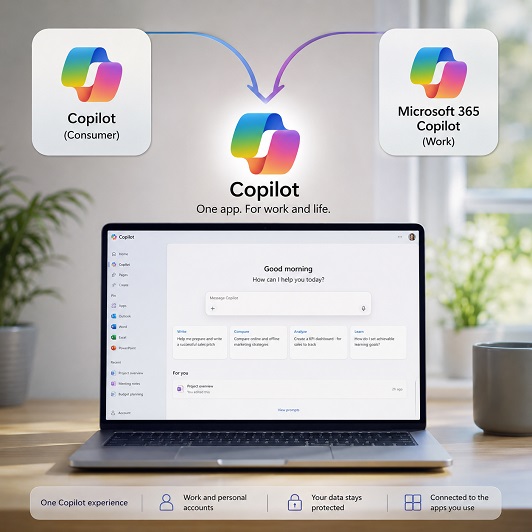
Microsoft Combines Its Copilot Apps
Microsoft has combined its standalone consumer Copilot and Microsoft 365 Copilot apps into a single updated Copilot experience, simplifying a confusing product line while making its AI assistant a more direct gateway into Word, Excel, Outlook and the rest of Microsoft 365.
Why Were There Two Copilot Apps?
For many people, Microsoft’s Copilot branding may have become difficult to follow in recent times. For example, the standalone Microsoft Copilot app operated mainly as a general-purpose AI assistant for consumers, while Microsoft 365 Copilot evolved from the old Microsoft 365, formerly Office, app and focused more heavily on productivity, files and workplace tools.
That distinction made more sense when the products were separate, but seemed to become less convincing as both gained overlapping AI capabilities and Copilot spread deeper into Windows and Microsoft 365. The company is now bringing those experiences together, saying it wants to create a “simpler, more cohesive experience for everyone”.
The updated Copilot app combines conversational AI and image creation with direct access to Word, Excel, Outlook, other Microsoft 365 apps, files and content. Microsoft describes the new approach as bringing together “the best of Copilot chat and image creation” with its productivity tools.
One App, Different Accounts
People will also be able to sign into the same Copilot app using personal, work or school accounts and switch between them, rather than moving between separate applications.
That doesn’t mean Microsoft is merging the data behind those accounts. The company explicitly says “Work and personal accounts remain separate”, with commercial data boundaries, tenant controls and compliance protections continuing to apply.
For businesses, that distinction matters. For example, an employee may be using the same Copilot application for personal and corporate activity, but information entered through a Microsoft Entra work account should not flow into the personal Microsoft account experience, and vice versa.
Users will also be able to connect services including email, calendars and cloud storage, allowing Copilot to use more relevant context when helping with work or personal tasks.
Why Is Microsoft Doing This?
The obvious benefit is reducing confusion, although there is clear commercial logic too.
Microsoft increasingly wants Copilot to become the place users start when they want to find information, create content, open documents or ask AI to complete a task. Putting chat, files and Microsoft 365 applications behind one interface gives the company a clearer route towards that goal.
It also creates a more obvious path from free Copilot use into paid Microsoft 365 services. People can continue chatting with Copilot, creating images and uploading files without paying, subject to capacity and usage limits, while Microsoft 365 subscriptions provide higher limits and access to more advanced capabilities such as agents and complex multi-step tasks.
In effect, the unified app becomes both a productivity tool and a much clearer front door into Microsoft’s expanding AI ecosystem.
What Happens To Existing Users?
For most users, Microsoft says the transition should require little effort. People using the consumer Copilot experience will be moved to the updated app, with their chat history and most existing content coming with them.
Those already using Microsoft 365 Copilot should see comparatively modest changes to appearance and navigation, while people who previously used both applications with a personal account will have their Copilot chats and created content brought together in the updated app.
Files shared or generated through the standalone Copilot app will be moved into OneDrive, further tying Copilot into Microsoft’s cloud ecosystem.
Some Features Are Disappearing
Combining the products also gives Microsoft an opportunity to remove features that no longer fit its plans.
For example, Podcasts, Group Chat and consumer Deep Research are being retired. Microsoft says users will no longer be able to continue conversations as Group Chats, while prompts and content contributed by other participants may become inaccessible, so customers are being advised to preserve anything they want to keep.
The Podcasts feature is no longer available, having stopped on 18 August, while Deep Research is also disappearing from the consumer Copilot app. Microsoft 365 Premium customers can instead use Researcher for more detailed research work.
Microsoft also warns that some features may be temporarily unavailable while the updated app is being rolled out, meaning the exact experience could vary by account and device for a time.
What Does This Mean For Your Business?
For businesses already invested in Microsoft 365, the change should make Copilot a bit easier to explain and easier for employees to find. Instead of presenting staff with several similarly named applications, Microsoft is now, thankfully, moving towards one recognisable Copilot interface whose capabilities depend on the account and subscription behind it.
That could actually help adoption as Copilot evolves from a chatbot into an assistant capable of working across email, documents, calendars, files and AI agents.
Businesses should still make sure employees understand which account they are using, particularly where personal and work profiles exist inside the same application. The interface may be unified, but the security and data boundaries deliberately remain separate.
It could also be said that with this move, Microsoft is signalling that it wants Copilot to become the main AI interface people use to access and work across Word, Excel, Outlook and the rest of Microsoft 365.